How to Digitize Your Manufacturing Plant in 5 Steps
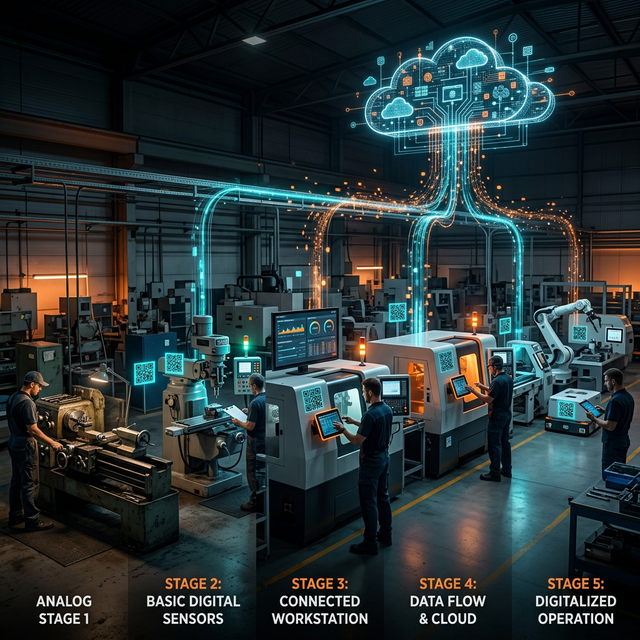
A practical, step-by-step guide to digitizing an industrial plant. No million-dollar investment, no 12-month projects. Visible results in the first week.
How to Digitize Your Manufacturing Plant in 5 Steps
"I want to digitize my plant, but I don't know where to start."
This is the sentence we hear most often from owners and managers of industrial small and mid-size companies. They have heard about Industry 4.0, IoT, Digital Twins — and it all sounds like a multi-million-dollar project that takes a year.
It doesn't have to be that way.
Digitizing a plant doesn't mean installing 50 IoT sensors or rolling out SAP. It means giving your operation the digital eyes and ears it needs to run better. And you can do that in 5 concrete steps, without a huge investment, with results visible from the first week.
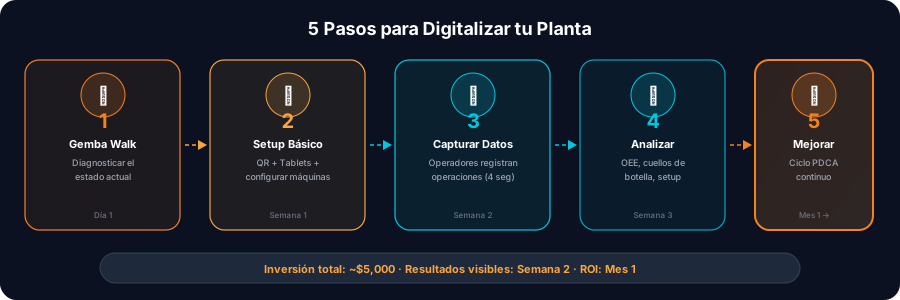
Step 1: Map Your Reality (Day 1)
Before buying any tool, you need to understand how your plant actually works — not how you think it works, or how the procedure says it should.
What to Do
- Draw your value stream: a simple diagram of how a part moves from raw material to finished product. Which machines does it touch? In what order?
- Identify your key machines: you don't need to digitize everything on day one. Which are the 5-10 most important machines? Which is your suspected bottleneck?
- Document the invisible: where does material pile up? How long does a setup take? How many times does the machine stop per shift? If the answer is "I don't know", that is exactly why you need to digitize.
Outcome
A simple map of your plant with the machines, the product flow, and a list of the 3 questions you can't answer today. Those 3 questions are your business case for digitizing.
Step 2: Install the Capture Points (Days 2-3)
You know what you need to see. Now you need to capture data from the floor. Forget IoT sensors for now — start with the most practical and accessible method: QR codes and mobile devices.
What to Do
- A QR code on every machine: print a QR code for each workstation and stick it somewhere visible. Each code identifies the machine in your digital system. Total cost: $10 for the whole plant.
- Pick your capture device:
- Minimum viable: operators use their personal smartphone
- Recommended: a $200 Android tablet mounted at each key workstation
- Premium: industrial tablets in shock-resistant mounts, plus handheld scanners for supervisors
- Configure your digital platform: with Patok Gemba, you register your machines, define their positions (start, middle, end of line) and assign the products they process. It is a one-day configuration.
Outcome
Every machine has a QR code, every workstation has a device, and the platform is ready to receive data.
Step 3: Start Capturing (Days 4-5)
This is where the magic starts. Operators begin logging their operations digitally.
The Operator's Flow
- Scan the machine's QR code to see their work queue
- Take a part and scan its QR code (or create it if this is the first operation)
- Start the operation with one tap
- Process as usual — the timer runs in the background
- End the operation with one tap when finished
Total time the operator spends: 4-6 seconds per part. Two taps. No forms, no keyboard, no paper.
Tips for the First Week
- Don't aim for perfection. If an operator forgets to scan, no harm done. The data accumulates gradually.
- Assign a champion per line: an operator who has got the hang of it and helps their colleagues.
- Make it mandatory but simple: the operator menu is designed to be as easy as unlocking a phone. If it's easy, it gets adopted.
Outcome
Real data from your operation starts flowing: timestamps for every operation, cycles per machine, logged stoppages.
Step 4: Open Your Eyes (Week 2)
The first week of data is revealing. This is the moment most managers say: "I had no idea this was happening."
What You Will Discover
- Your real OEE — probably 15-20 points below what you believed
- Where WIP piles up — the real bottleneck versus the one you suspected
- How long setups take — the number nobody was measuring
- Real cycle times versus the time study from three years ago
- Variability between shifts and operators — is the night shift really as productive as it says?
What to Do With the Data
- Turn on the Digital Twin: with Patok, see your whole plant on one screen — every machine with its state, every part with its location, metrics in real time.
- Install digital Mieruka: put a screen at each workstation showing target vs actual. The operator now has immediate feedback.
- Identify your top 3 problems: build a Pareto of stoppages by frequency and duration. The top 3 stoppage types probably account for 70% of your lost time.
Outcome
For the first time, your plant has digital eyes. You can see what used to be invisible. The production meeting shifts from debating opinions to debating data.
Step 5: Improve With Data (Week 3 and Beyond)
Now that you see reality, you can act on it. This is where digitization pays for itself.
Quick-Impact Actions
1. Attack the bottleneck The data shows you your real constraint. Apply the principles of the Theory of Constraints:
- Make sure that machine never stops for lack of material
- Cut its setup to a minimum (SMED)
- Give its preventive maintenance priority
2. Standardize setup times Now that you measure real setups, set standards. "The CNC setup for product X shouldn't take more than 12 minutes." The system alerts when it goes over.
3. Balance loads between shifts Productivity data by shift reveals imbalances. Maybe the night shift produces 30% less — why? Lack of material? Fewer operators? Less supervision?
4. Run a digital Gemba Walk Now your Gemba Walk happens with data in hand. As you walk the plant, you scan each machine's QR code and see its performance in context. Decisions get made on evidence.
5. Communicate the results Share the before and after with your team. "CNC-3's cycle time dropped from 4.2 to 3.5 minutes this week." Recognition based on data motivates more than any speech.
Outcome
Your plant begins a cycle of data-driven continuous improvement — real digital Lean Manufacturing. Every week is better than the last, and you have the data to prove it.
What Does It Cost?
| Item | Investment | Note |
|---|---|---|
| Printed QR codes | ~$10 | Laminated stickers for each machine |
| Android tablets | $200-400 each | One per key workstation |
| Industrial mounts | $30-50 each | To mount the tablets |
| Patok platform | Monthly subscription | No setup fee |
| Total for 10 machines | $2,500-$5,000 | You can start with less |
Compare that with an IoT + SCADA project ($50K-$200K), an MES implementation ($100K-$500K) or an SAP pilot ($200K+).
The Most Common Mistakes
1. "Let's digitize the whole plant at once"
No. Start with one line or one area. Show results, build confidence, then scale.
2. "We need the ERP first"
No. An ERP manages your business (finance, purchasing). A Digital Twin manages your floor. Different layers. You can digitize the floor without an ERP.
3. "We have to wait until the machines have IoT"
No. Read our article on implementing a Digital Twin without IoT. 90% of the visibility comes from QR codes and tablets.
4. "The operators won't use it"
They will — if the tool is easy. If scanning takes 3 seconds and filling in an ERP form takes 5 minutes, which do you think they'll prefer?
Conclusion: It Isn't a Question of When, but of How
Digitizing your plant is not a "someday" project. It is something you can start this week with what you already have.
The path is simple:
- Map → understand your reality
- Capture → put QR codes and tablets on the floor
- Start → operators begin logging
- See → the Digital Twin shows you the invisible
- Improve → act on real data
The first OEE figure you see will surprise you. The first bottleneck you detect will frustrate you. And the first improvement you achieve with data will convince you that you should have done this years ago.
Ready to take the first step? Book a free diagnostic Gemba Walk — in an hour we map your most critical line and show you what it would look like digitized.
Topics
Ready to transform your plant?
Book a free adoption session and find your biggest opportunity to improve with industrial AI.
Book an Adoption Session